Aeries Online Enrollment (for students NEW to Exeter Unified)
NEW STUDENT ENROLLMENT PROCESS for EXETER UNIFIED SCHOOL DISTRICT
This process is only for new students to Exeter Unified School District for the 2026-27 school year. If you attended Exeter Unified on the last day of the school year in 2025-26 then you will use the Parent Confirmation Process using the Aeries Parent Portal for 26-27 school enrollment.
If you are enrolling in our Pre-School Program you need to contact them directly to set up an appointment to meet in person for enrollment (559) 671-0433. You do not use this process for Pre-School Programs all other grades TK-12 use the Aeries Enroll Path process.
Aeries Enroll Path allows you to quickly start the process of registering a new student for school. Information about the student such as emergency contacts, medical and language information will be collected. Upon completion, the student's information is electronically sent to the school.
To get started registering a new student, go to https://aeriesenroll.com/exeterusd/guardian and create an account. (Step by step directions are below on how to do this)
The online process typically takes 20-30 minutes. If you are unable to complete the process at one sitting, you may logout, and resume the process at a later time.
To enroll a new student, you will be required to provide the following documents:
- Proof of age: birth certificate, passport, hospital certificate or other official document showing students age
- Proof of address address (utility bill listing name/address, and Current Mortgage Statement, Rental Agreement (including signature page), or Property Tax bill or Residency Affidavit
- Immunization records
- Parent/guardian Identification
- Court documents (e.g., restraining orders) if applicable
Please make sure you have this information available before continuing. If you do not have this information available, please return to webpage when you do. You can also hand deliver the documents to the school office.
If unsure which elementary school you will be enrolling to, you can check your address in our boundary map locator. https://exeterunifiedschoolexplorer.azurewebsites.net/
What do I do after completing the online data entry process?
Enrollment is completed at the school site. At your assigned school, you will be required to provide proof of residence before completing the enrollment process. The school will contact you if it needs any further information or with questions regarding the enrollment.
If you have any questions about the enrollment process you can contact the school you are enrolling to.
Pre-School Programs (559) 671-0433
Lincoln: (559) 592-2141 (Grades TK-5)
Rocky Hill: (559) 592-5490 (Grades TK-5)
Wilson Middle School: (559) 592-2144 (Grades 6-8)
Exeter Union High School: (559) 592-2127 (Grades 9-12)
Kaweah High School/Independent Study Programs (559) 592-4420

Scan QR code to go directly to Aeries Enroll Path Login Screen
Creating Your Account ↑
New users must create a guardian account before accessing the portal.
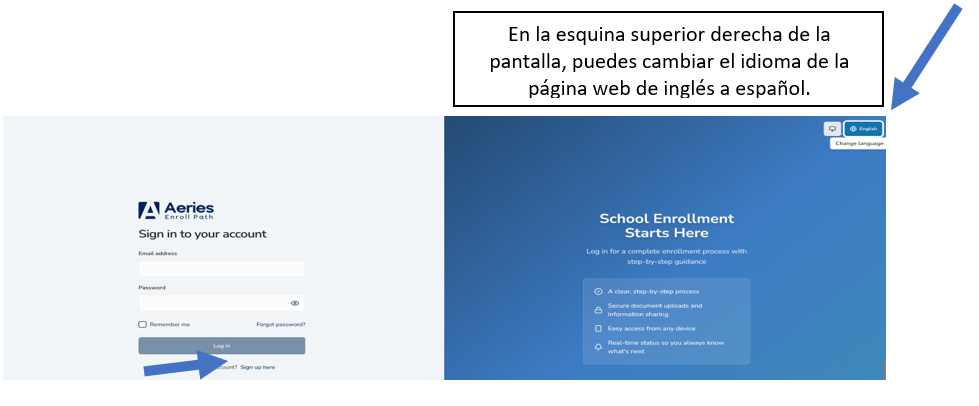
- Go to the Enroll Path Webpage: https://aeriesenroll.com/exeterusd/guardian
- Click Sign up here on the login screen.
- Complete the Create Guardian Account form:
- Email Address — Use a valid email you check regularly
- Password — Must be at least 8 characters long
- Confirm Password — Re-enter your password to verify
- Click Create account.
- Verify your email:
- Check your email inbox for a verification message
- Enter the 6-digit verification code
- If you don't receive the email, check your spam folder or click Resend code
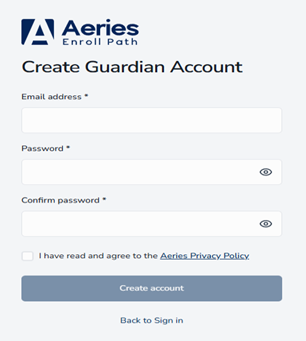
Fill out the above information after you clicked Sign Up Here
Logging In to the Guardian Portal ↑
Returning users can sign in using their existing credentials.
- Go to the Enroll Path Webpage: https://aeriesenroll.com/exeterusd/guardian
- Enter your Email and Password. Your email address is not case-sensitive — you can type it in any combination of upper and lowercase letters.
- (Optional) Check Remember Me to save your email for future logins.
- Click Log in.
Resetting Your Password ↑
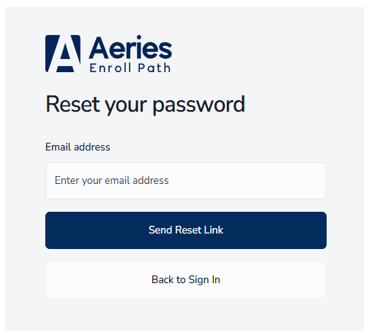
If you forget your password, you can reset it through the login screen.
- Click Forgot password? on the login screen.
- Enter your email address.
- Click Send Reset Link.
- Check your email for password reset instructions.
- Follow the link to create a new password.